
IX250 E-Scooter - FAQ
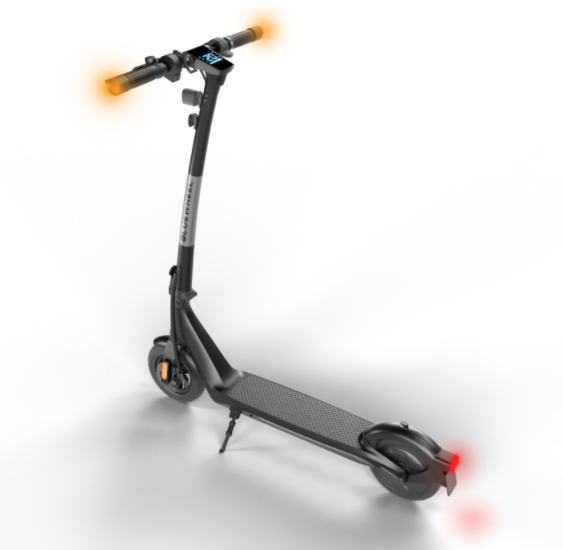
IX250 Product Photo
IX250 Assembly Video
FAQ
In what weather conditions can I use my e-scooter?
Please use the e-scooter only when visibility is good and the weather is fine. Do not use it in rain, snow, or icy conditions. The recommended ambient temperatures for riding the e-scooter are +5 to +30°C (it can also be used between -10 and +40°C).
What is the overall handlebar width, and how wide is the handlebar without the turn signals?
The handlebar is 60 cm wide including the turn signals and 50 cm wide without them.
What do the motor indicator lights on the right-hand side of the display mean?
RED indicates that the motor is active, while GREEN indicates that the motor is ready. If the light at the top right is illuminated and resembles a thermometer, this means the motor is warm and needs time to cool down. We recommend allowing the motor to cool down sufficiently before using it again.
Troubleshooting & Quick Fixes
Meaning of the error messages
- Error 4 (E4) - Short circuit fault code - Short circuit fault
- Error 10 (E10) - Instrument panel - Controller communication failure / Display error - Controller communication failure
- Error 14 (E14) - Throttle failure / Throttle error - Throttle failure
- Error 15 (E15) - Brake failure / Brake error - Brake failure
- Error 16 - (E16) - Motor haul fault / Motor drive error
- Error 50 - (E50) Voltage too high / Voltage too high
- Error 53 - (E53) System overload / System overload
- Error 55 - (E55) Controle overheat / Controller overheating
Repair Instructions
How do I inflate the tires on the IX250?
To inflate the tires, you need a valve adapter with a check valve – 90 degrees for car valves. You can find this adapter on Amazon or at most bicycle shops.
How do I replace the battery on the IX250?
- Fold the IX250 and turn it upside down. Remove the 14 Phillips-head screws. Remove the 2 stand screws using a size 3 Allen key.
- Remove the front cover.
- Carefully remove the battery cover, turn it over, and slide the heat-shrink tubing to the side. Disconnect the red plug.
- Disconnect the battery plug and replace the battery.
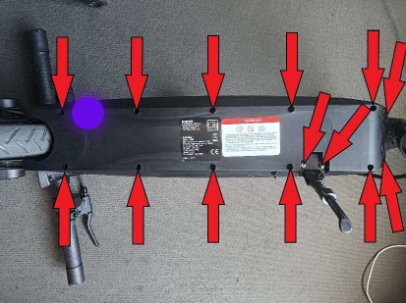
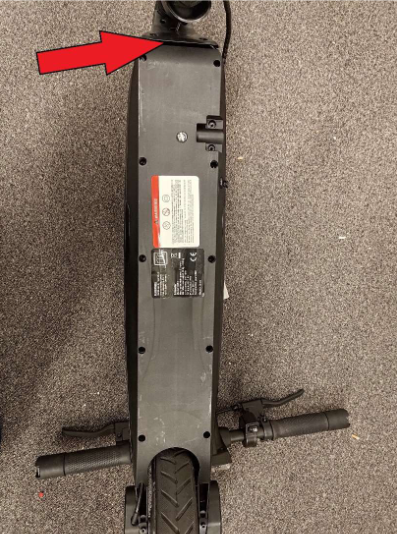
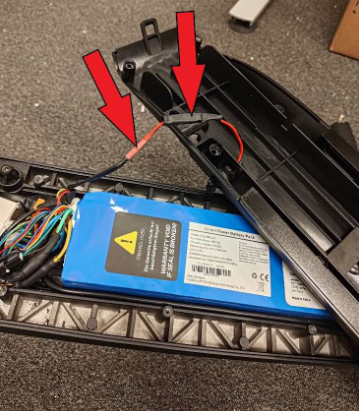
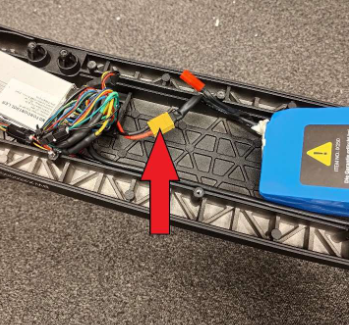
How do I remove the rear wheel of the IX250?
1. Remove the cover: Use a size 3 Allen key to remove the covers on both sides of the wheel guard.
2. Prepare the scooter: Fold the IX250 and carefully turn it upside down so you can easily access the rear wheel. Use a size 3 Allen key to remove the four screws on the rear wheel, then remove the two plates.
3. Remove the screws: Unscrew the 14 Phillips-head screws on the underside of the scooter. Also remove the two stand mounting screws using a size 3 Allen key.
4. Front cover: Carefully remove the front cover to access the internal components.
5. Battery cover and plug connections: Carefully lift off the battery cover, turn it over, and slide the heat-shrink tubing to the side. Then disconnect the red plug. Locate the three motor plugs. Use a knife to remove the black heat-shrink tubing and disconnect the three plugs. Cut the cable tie securing the compact plug and disconnect this plug as well.
6. Remove the axle nuts: Use an 18 mm open-end wrench to loosen the nuts on both sides of the rear axle. Lift the rear wheel up and out to remove it completely.
Replacing the rear tire/tube
Step-by-step instructions:
- Make sure you have the following tools and parts: Phillips screwdriver, size 3 Allen key, 17 mm open-end wrench, 50/75-6.1 rear tire, and 50/75-6.1 inner tube.
- There are cover caps on both the left and right sides, each secured with 2 screws. Remove them using a size 3 Allen key.
- Under the silver 17 mm nuts, you will see a metal retainer on both the left and right sides. Remove these using a size 3 Allen key as well.
- Now remove the 10 Phillips-head screws from the lower cover and the 2 screws from the side stand using a size 3 Allen key. Let the rear section of the cover hang down slightly.
- Unscrew the two 17 mm nuts from the drive wheel and remove the wheel.
- On the right-hand side in the direction of travel, unscrew the cover from the drive wheel (6 Phillips-head screws). Remove the valve retainer.
- You can now remove the tire (make sure to remove it on the left-hand side in the direction of travel because of the motor communication cable).
- After replacing the 50/75-6.1 inner tube or the 50/75-6.1 tire, reassemble everything in reverse order.
Which tire and inner tube do I need for my IX250?
You need the following for the IX250:
- Tire size: 50/75-6.1
- Inner tube size: 50/75-6.1
These are common sizes and can be purchased online (e.g. from Amazon or eBay) or at a specialist bicycle shop/repair shop.
The spare parts list contains all the spare parts you may need.
To get started with your e-scooter right away, you can find all the information in the Quick Start Guide.
You can find all the important information in the manual.