
sGym Pro Multi-Gym FAQ
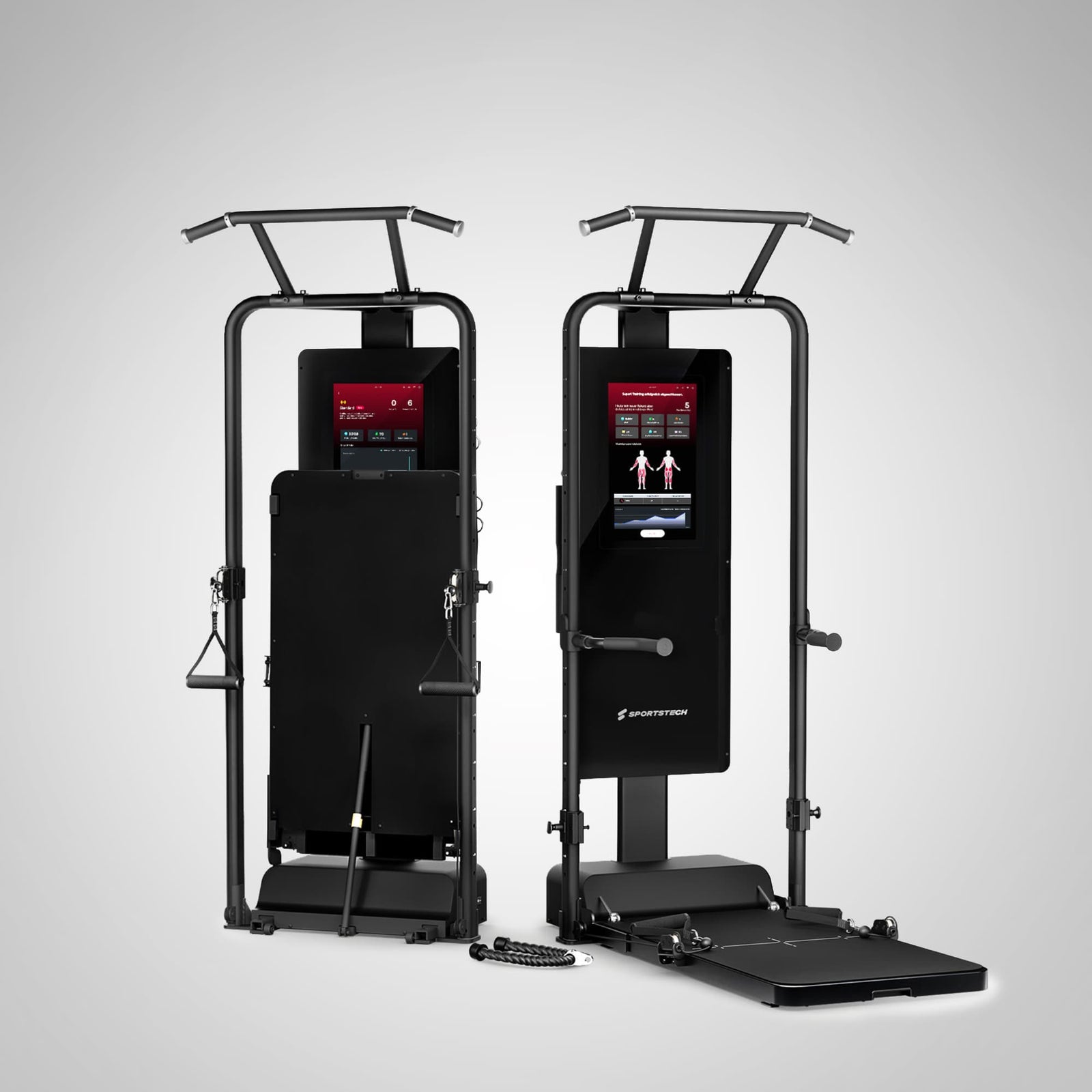
sGym Pro Strength Station Product Photo
sGym Pro Walkthrough Video
FAQ
What is the maximum user weight for the sGym Pro?
The maximum user weight for the sGym Pro is 200 kg. The maximum training resistance is 120 kg, split into 60 kg per arm and generated by two electric motors.
What are the dimensions of the assembled strength station?
The sGym Pro has the following dimensions when assembled: With pull-up bar: 218 × 91 × 156 cm (L × W × H) Without pull-up bar: 196 × 91 × 156 cm (L × W × H)
What are the dimensions of the folded unit?
The sGym Pro has the following dimensions when folded: With pull-up bar: 218 × 91 × 54 cm (L × W × H) Without pull-up bar: 196 × 91 × 44 cm (L × W × H)
Can it connect to the SportstechLive app?
Yes. The Sportstech Live app is fully integrated into the sGym Pro display. In addition, buyers receive 1 year of free access to the premium version of the Sportstech Live app.
What advantages does the sGym Pro offer over other models?
- Smart strength station with integrated display
- Precise resistance control via electric motors
- Up to 120 kg of training resistance
- Four different training modes for individual training goals
- Over 400 integrated exercise videos
- Full-body workouts possible in a small space
- Negative resistance for effective training in both directions of movement
- Integrated pull-up bar and dip bars for additional exercises
- Space-saving design with fold-up base plate
Which training programs are available?
- Standard mode: Consistent resistance for strength and endurance training
- Eccentric mode: Focuses on the return phase for more intensive muscle building
- Isokinetic mode: Resistance adjusts to the pulling speed
- Elastic mode: Resistance increases as the cable is pulled further
- Partner mode: Two people can train at the same time with different resistance levels
What maintenance intervals are recommended?
We recommend checking the sGym Pro regularly to ensure safe and reliable use.
Regular checks:
Before each use, check that the screw connections, cables, carabiners and moving components are secure and free from damage.
Cleaning:
After training, remove sweat and dirt from the handles and contact surfaces.
Care:
Regularly check that the moving parts run smoothly and care for them as appropriate when necessary.
Does the sGym Pro have a TÜV seal?
Our products are manufactured with care in compliance with strict European safety standards and regulations. We place great importance on ensuring that every component and every detail meets our high quality standards, so we can offer you products with outstanding safety and reliability.
What is the sGym Pro?
The sGym Pro is an intelligent, smart strength station with an integrated display. Resistance is generated by modern motors rather than weight plates, allowing it to be controlled with particular precision and flexibility. With a maximum training resistance of 120 kg, it enables a wide range of workouts for all fitness levels. Over 400 integrated exercise videos are available directly on the unit, supplemented by additional training videos. Despite its performance, the unit takes up very little space, making it suitable for smaller rooms too. It enables a full-body workout and helps you effectively achieve your individual fitness goals.
What is the maximum load supported by the sGym Pro, and is it powered by electric motors?
The sGym Pro offers resistance of up to 120 kg, split into 60 kg per arm. The system is powered by two electric motors.
How is resistance generated during training?
Resistance is generated and precisely controlled by the integrated electric motors.
Is resistance available in both directions of movement (concentric and eccentric)?
Yes. You feel resistance during concentric training, when you push or pull the weight up, as well as during eccentric training, when you slowly give way and lower the weight again. This evenly loads the muscle during both phases of the movement, making your workout more intensive and effective.
How many positions does the locking mechanism have, and at what heights can it be adjusted?
There are twelve different height settings. This makes the unit suitable for people between 150 and 200 cm tall.
What is the minimum weight that can be set, and how precisely can I adjust it?
The minimum weight per side is 2.5 kg and can be adjusted in 0.5 kg increments.
What materials is the sGym Pro made from?
The sGym Pro is made from high-quality, durable materials. The frame is made of thick, rust-resistant steel and also has a wear-resistant coating. Robust aluminum components are also used in the base, providing stability while keeping the unit easy to handle.
Does the unit provide negative resistance?
Yes, the sGym Pro also generates negative resistance, meaning you have to exert force when pulling back as well.
What training data is shown on the display?
The display shows the four training modes by default, supporting a range of different training goals. You can adjust the resistance settings directly on the screen. Once a workout has started, the system also creates a line graph that visualizes your exertion in real time.
Can the sGym Pro connect to the Sportstech Live app?
The Sportstech Live app is already fully installed on the sGym Pro display. When you purchase the smart strength station, you also receive 1 year of free access to the premium version of the Sportstech Live app.
What benefits does the Sportstech Live app premium subscription offer, and how can I use it to train?
With a premium subscription, you get access to a wide range of exclusive features that take your training to the next level. Our home fitness equipment guides you through varied workouts in professionally designed studio sessions. In addition, our AI coach provides personalized recommendations tailored to your goals and progress. Your training results are recorded in a clear dashboard, so you can keep track of your performance data and personal milestones at any time. Regular updates with new workouts, features and content also ensure your training never gets boring and help keep you motivated.
What is included in the delivery?
In addition to the sGym Pro, a wide range of accessories is included.
- Pull-up bar
- Non-slip floor mat (protects against scratches)
- Dip bars
- Two single handles
- Barbell with shoulder pad
- Weight belt
- Ankle strap
- Two extender belts
- Triceps rope
Which additional accessories are available?
The handles are already included and can be stored neatly on the back of the strength station. The sGymBench incline and flat bench, which supports up to 220 kg, is available to order separately. Combined with the cable pulley, it enables a variety of new exercises, such as bench presses and lat pulldowns.
Cardio training is also possible on the strength station. The sGym Rower can also be purchased separately. It lets you row on the sGym Pro.
What exercises can be performed with the sGym Pro?
The sGym Pro enables a comprehensive full-body workout. Exercises include bench presses for the chest and triceps, lat pulldowns or rows for the back and biceps, and squats with resistance for the legs and core. You can also perform numerous other exercises for the shoulders, abdomen and other muscle groups.
Can I also do bodyweight exercises (calisthenics) on the sGym Pro?
Yes, the integrated pull-up bar lets you perform different variations of pull-ups, for example, while the dip bars mounted on the sides can be used for dips or leg raises that work the chest, arms and core.
What does the pull-up assistance feature do?
The pull-up assistance feature helps you perform pull-ups even if your body weight still feels too heavy. The sGym Pro motors compensate for part of your body weight, so you can pull with less resistance and gradually build up your strength. To use it, put on the weight belt, set the cable pulley to the highest position and clip the carabiners onto your belt. Then set the desired weight on the display.
How do weighted dips and pull-ups work?
With the sGym Pro, you can do dips and pull-ups not only using your body weight, but also with additional resistance or assistance. To do this, use the weight belt, which attaches directly to the cable pulley with a carabiner. Set the cable pulley to the lowest position. Depending on the setting, you can add weight to make the exercise harder, or program the motor to assist you as you pull yourself up (pull-up and dip assistance feature).
How much space does the unit need when set up?
The sGym Pro requires a floor area of around 0.5 square meters, making it suitable for smaller rooms too.
What is the spotter, and how can I use it?
The spotter works like a remote control for your strength station. You can use it to start your workout and increase or decrease the resistance. The spotter can also be attached to the barbell. This means you can safely perform heavy strength exercises such as shoulder or bench presses. If the resistance is too high, you can switch it off immediately using the spotter.
How do I switch off the sGym Pro? (Switching off using the power button)
Switching off: The sGym Pro is switched off using the power button.
Does the sGym Pro have a maximum strength measurement or strength test?
Maximum strength measurement: The sGym Pro does not offer a maximum strength measurement or strength test.
Can the sGym Pro be moved? Can I move it around the room?
Yes, you can move the sGym Pro around the room thanks to its integrated transport wheels. To do this, fold up the base plate. Hold the pull-up handles, keep one foot at the bottom of the motor and carefully begin tilting the unit forward. Once the unit is tilted at an angle of around 45°, you can maneuver it around the room fairly easily.
Important! To avoid accidents, we recommend having at least one other person assist you!
Can I fold up the base?
Yes, you can easily fold the base up vertically and lower it back down horizontally just as easily thanks to the integrated lowering function.
How long does assembly take?
Assembly takes between 10 and 20 minutes. You only need to attach the pull-up bar using 6 screws.
Is assembly included with delivery?
No, standard delivery is by freight carrier to the curbside. On-site assembly by an external service provider is available as an optional extra for an additional fee. /p
Troubleshooting & Quick Fixes
sGym Pro won't start – perform a hard reset
Description:
The sGym Pro is not responding correctly, does not start properly, or needs to have its system settings restored.
Solution:
Please perform a hard reset on the sGym Pro:
1. Open the back of the sGym Pro unit.
2. Locate the reset button. It is below the two USB ports.
Image showing the position of the reset button:
https://www.sportstech.care/hc/article_attachments/27564451241244
3. Press and hold the reset button.
4. Switch off the unit while continuing to hold down the reset button.
5. Switch the unit back on after approx. 5 seconds and continue holding down the reset button.
6. Release the reset button as soon as “Upgrading” appears.
7. Wait for the unit to restart automatically.
8. Then install the software update offered.
sGym remote control (insert module, replace battery, troubleshoot)
1) Remove the control board from the silicone ring / rubber housing
- The remote control consists of:
- Silicone finger ring (holder / rubber housing)
- Remote control board (insert with electronics + CR2032 battery)
2) Remove the control board from the silicone ring / rubber housing
- Hold the silicone ring / rubber housing firmly.
- Gently squeeze the two rubber sides of the remote control together.
- This will loosen the control board so it can be carefully removed.
Note:
The control board may be tight at first – this is normal.
3) Replace the battery (CR2032, 3V)
- The button cell battery is located on the back of the control board.
- Insert a small screwdriver into the designated notch at an angle of approx. 45 degrees.
- Carefully pry the battery upward until it comes loose from the holder.
- Insert the new button cell at an angle of 45 degrees as well.
- Start with the side without an opening, then press the battery fully into the holder.
4) Reinsert the control board correctly
- The control board has four pegs (tabs) that must fit precisely into the corresponding openings.
- Check that all four pegs are seated correctly.
- Press the control board straight in until it sits flush.
5) If the remote control does not respond (troubleshooting)
- Check that the control board is seated correctly.
- Remove the battery, wait 10 seconds and reinsert it.
- If necessary, try a new CR2032 battery.
- Test the remote control right next to the unit.
Wireless switch function:
The wireless switch controls the start/stop function for resistance.
Activate pairing mode:
Press and hold the middle button on the switch. Pairing is complete when the blue light flashes 5 times.
Reset pairing / delete connection:
Press and hold the middle button again. The existing pairing is cleared when the red light flashes 5 times.
Quick fix if the connection is lost:
Press and hold the middle button for approx. 5–10 seconds until the blue light flashes 5 times.
sGym Pro maintenance & cleaning
Maintenance:
Regularly check all screw connections and make sure they are tightened securely.
Regularly inspect the cables, carabiners and moving components for wear or damage.
Cleaning:
Clean the sGym Pro regularly with a soft, dry or slightly damp cloth.
Remove sweat and dirt after training.
Lubrication / care:
Regularly check that the moving components run smoothly.
Technical data & listing information
Product & package details
- Shipping method: Freight carrier
- Product weight: 115 kg
- Max. load capacity: 200 kg
- Electronic resistance: up to 120 kg (60 kg per side), powered by two electric motors
- Package dimensions: 2056 × 910 × 491 mm
- Package weight: 140 kg
- Color: black
Power & safety
- Power plug: CEE 7/7 grounded plug
- Voltage/frequency: 100–240 V, 50–60 Hz
You can find all the important information in the manual.