
sProRun Treadmill FAQ
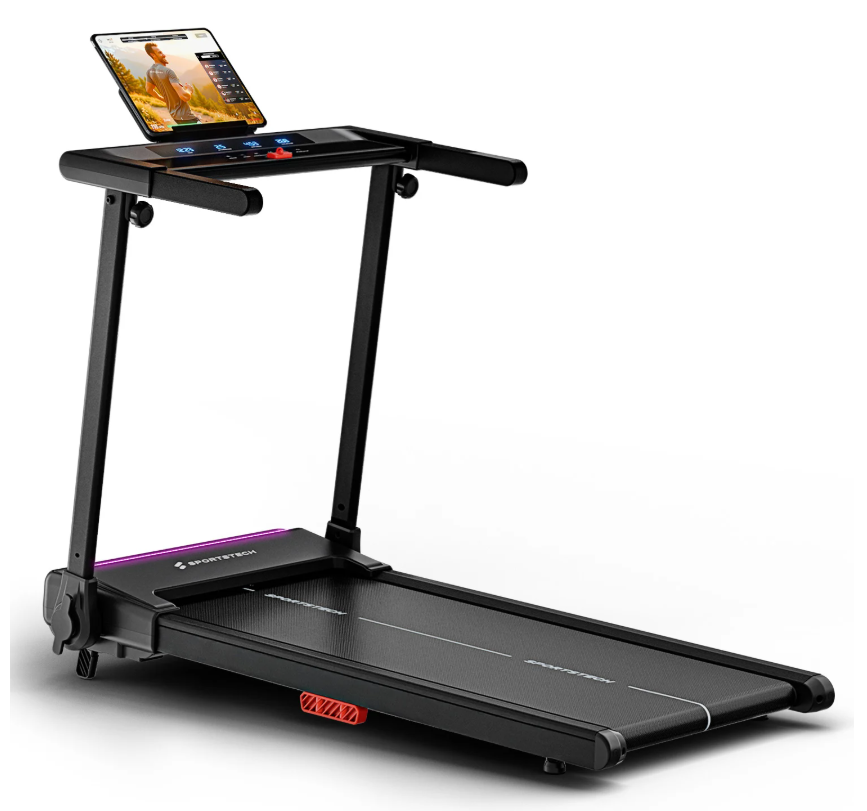
sProRun Treadmill Product Photo
sProRun Assembly Video
FAQ
Are distances displayed in kilometers or miles?
The distance on the treadmill is displayed in kilometers (km).
When do I need to lubricate the running belt?
To ensure the treadmill works properly and has a long service life, the running belt must be lubricated regularly with silicone oil. Thin tubes underneath the device form an integrated lubrication system.
Silicone oil should be added after the first 25 operating hours (approx. 2–3 months), and no later than after 50 operating hours (approx. 5–8 months).
Important: Be sure to unplug the power cord before lubricating the treadmill. If you are unsure, run your finger over the top of the running deck beneath the running belt. If the running deck feels slightly oily, it is sufficiently lubricated.
How do I clean the treadmill properly?
We recommend wiping sweat off the device with a slightly damp cloth after each use. Please do not use abrasive cleaners or solvents.
Be careful when handling liquids and never allow moisture or water to come into contact with the computer or other electronic components.
Is the sProRun treadmill compatible with the Sportstech Live App?
Yes, the sProRun treadmill is compatible with the Sportstech Live App.
Does the treadmill have a vertical storage function to save space?
Yes, the treadmill has a convenient vertical storage function and can be stored upright to save space.
How can I adjust the LED color and lower the startup sound?
The LED colors adjust automatically according to the speed or heart rate zone. The startup sound has a fixed volume and cannot currently be adjusted.
How much electricity does the treadmill use?
The sProRun treadmill is energy-efficient and has comparatively low power consumption.
My running belt is not tight enough. What can I do?
The treadmill belt is pre-tensioned at the factory. However, normal use may cause the running belt to stretch over time. If this happens, it may need to be retensioned.
Adjust the tension using the screws in the end caps of the treadmill frame with the supplied Allen key. Turn the screws alternately and evenly on both sides, approximately a quarter turn clockwise each time.
Please do not overtighten the running belt.
Can I jog on the treadmill, and what is its maximum speed?
The sProRun treadmill is suitable for jogging. Its maximum speed is 12 km/h.
Is the treadmill compatible with heart rate monitors, and how do I pair them?
The treadmill is compatible with Sportstech's sPulse heart rate monitor. Pairing is done via the Sportstech Live App.
How loud is the treadmill during operation, and is it suitable for an office?
The treadmill is relatively quiet during normal operation, making it suitable for use in an office.
How large is the running surface, and what is included?
The running surface measures 100 × 40 cm.
The package includes the treadmill, a power cord, the user manual, a safety clip, and the tools required to attach the support feet.
Is the treadmill suitable for users of all weight classes?
The sProRun has a maximum user weight of 150 kg.
What is the minimum age for using and maintaining the treadmill?
The treadmill may only be used by adults. Children under 14 years of age must not use the device or perform cleaning or maintenance work.
Children and pets must be kept at least 3 m (10 ft) away from the device. The moving running belt is particularly dangerous.
What should I consider when setting up the device?
Set up the treadmill only indoors in a dry area. The surface should be stable and level, and no ventilation openings should be blocked.
Make sure there is enough clearance in front of, behind, and beside the treadmill.
Can I use the treadmill with the bar folded down?
No. The sProRun is not a 2-in-1 treadmill and cannot be used with the bar folded down.
What is the sProRun?
The sProRun is our latest treadmill for home use and is ideal for fast and effective running workouts.
LED colors adjust to your running speed of up to 12 km/h. A tablet holder and LCD display provide a clear overview. The 9% incline increases workout intensity, while the modern cushioning system protects your joints.
With its folding function, smart controls, and Bluetooth connection to the Sportstech Live App, the sProRun is ideal for your home gym.
What is the Sportstech Live App, and how can I train with it?
The Sportstech Live App offers over 350+ workouts and landscape videos featuring professional home fitness trainers.
Keep track of your running data, monitor milestones with smart fitness tracking, and benefit from challenges, a large community, and over 80 fitness recipes and nutrition tips.
Troubleshooting & Quick Fixes
Error SAFE – Safety Key
⚠️ Error SAFE – Safety Key
Description:
The safety key is not positioned correctly, or the magnet is too weak.
Solution:
Insert the key correctly, check the magnet, or try replacing it.
Error 1 – Cable Connection
⚠️ Error 1 – Cable Connection
Description:
Loose or faulty cable connection between the display and motor.
Solution:
Disconnect the device from the power supply, open the motor cover, and check all plug connections.
Error 2 – Motor or Control Board
⚠️ Error 2 – Motor or Control Board
Solution:
Replace the motor or control board.
Error 4 – Voltage Issue
⚠️ Error 4 – Voltage Issue
Solution:
Plug the device directly into a wall outlet and check the plug connections.
Error 5 – Control Board / Motor
⚠️ Error 5 – Control Board / Motor
Solution:
Usually, the control board needs to be replaced; the motor may also need to be replaced.
Error 7 – Motor Overvoltage
⚠️ Error 7 – Motor Overvoltage
Solution:
Loosen the running belt; replace the motor if necessary.
Error 8 – Defective Drive Motor
⚠️ Error 8 – Defective Drive Motor
Solution:
Replace the drive motor.
Repair Instructions
How do I replace the locking screw?
Preparation:
- Disconnect the device from the power supply
- Remove all screws on the underside and take off the cover
- Lay the device on its side
- IMPORTANT: Take a photo of the wiring before removing anything
Accessing the locking screw:
Depending on which side needs to be opened, you will need to remove either the circuit board or the motor:
Removing the circuit board:
- The plugs are secured with adhesive – remove it carefully
- Disconnect all plug connections
- Remove the circuit board's mounting screws and take out the circuit board
Removing the motor:
- Disconnect the power connections to the motor
- Remove the motor's mounting screws and take out the motor
Replacing the locking screw:
- Remove the Phillips screw securing the locking screw
- Remove the old locking screw
- Insert the new locking screw through the opening
- Insert the spring inside (very important!)
- Tighten the locking screw securely
- Reinsert and tighten the Phillips screw to secure it
Reinstalling the motor (if removed):
- First loop the drive belt over the motor pulley, then guide it over the running roller
- Turn the running belt manually as if you were walking on it
- The belt will align itself automatically and move upward
- This work should be carried out by two people
- Reconnect all plugs using the photos you took
- Replace the bottom cover and tighten the screws
⚠️ Safety instructions:
- Never work on the device while it is connected to a power supply
- ALWAYS take photos of the wiring before removing anything
- The spring is a critical component – make sure it is installed correctly
The spare parts list includes all individual components used in the device.
The manual contains all the important information on use and maintenance.