
sWalk Lite Treadmill FAQ
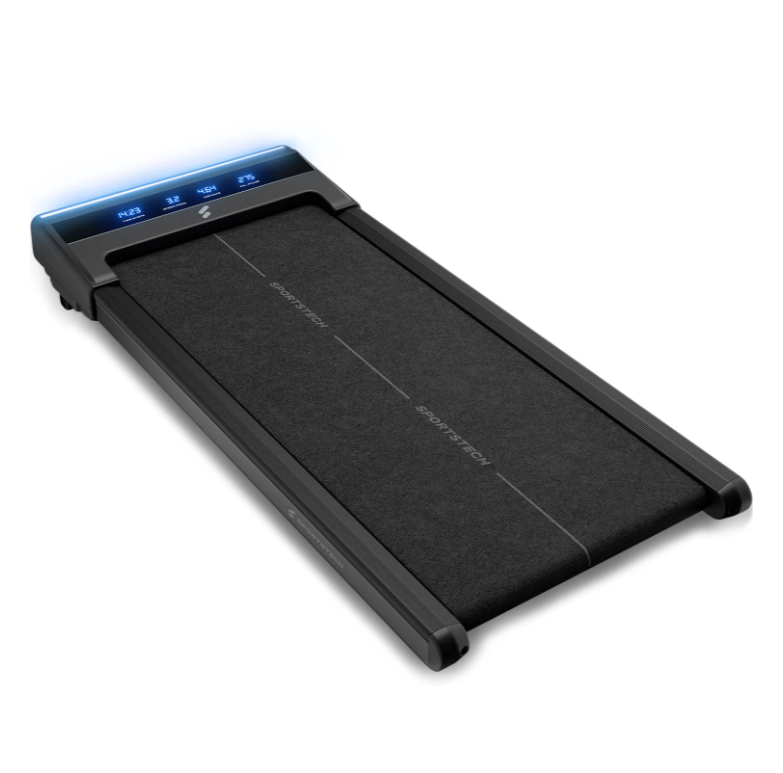
sWalk Lite Walking Pad Product Photo
sWalk Lite FAQ
What is the sWalk Lite Walking Pad and what makes it special?
The sWalk Lite is a space-saving, motorised treadmill for walking and light jogging. It combines modern design with innovative features and is ideal for staying active in your everyday life—whether in your home office or in between tasks.
Special features:
- Compact height of only 12.5 cm
- Patented LED function with 7 colour settings (blue to magenta)
- Manual 6% incline
- Bluetooth connection to the Sportstech Live app
How can the Walking Pad be stored?
Thanks to its low height (12.5 cm) and integrated transport wheels, the device is especially versatile:
- Can be stored vertically against a wall
- Can be stored under a bed, sofa or cabinet
How much does the sWalk Lite weigh?
The device weighs 18.9 kg, making it stable yet easy to move.
What is the size of the running surface?
The running surface measures 100 x 40 cm.
How high is the top of the running surface from the floor?
The distance between the top of the running surface and the floor is approx. 12.5 cm.
What is the maximum user weight supported?
The maximum user weight is 150 kg.
What speeds are possible?
The speed range is between 1 and 6 km/h.
Does the sWalk Lite have an incline function?
Yes, it has a manual incline of 6%. The incline supports are located at the front, beneath the motor, and must be folded out manually.
What programmes and training modes are available?
There are 4 preset programmes (P01–P04). You can also set individual goals for time, distance or calorie consumption.
How is the Walking Pad controlled?
It is controlled using a remote control:
- Adjust the speed
- Switch programmes
- Turn the LED function on/off
- Start, pause and stop
Alternatively, the device can be connected to the Sportstech Live app via Bluetooth.
Is the treadmill suitable for outdoor use?
No, the sWalk Lite is intended for indoor use only.
What type of footwear is suitable?
Wear trainers with smooth, flat soles. Trail shoes or rough soles can cause increased wear.
What size should a floor protection mat be?
At least 125 × 55 cm.
What does “Refurbished” mean?
Refurbished devices are products that have been technically inspected and reconditioned, with minimal signs of use, and are offered at a reduced price.
Troubleshooting & Quick Fixes
No power
Check the power cord and socket. Connect directly to a wall socket.
Treadmill slips
Tighten the running belt using the tool supplied, as described in the manual.
Remote control not working
Replace the remote control batteries.
Error SAFE – Safety Key
⚠️ Error SAFE – Safety Key
Description:
The safety key is not in place, or the magnet is too weak. Your treadmill will not start unless the key is correctly in place.
Solution:
Check that the safety key is correctly inserted in its designated slot.
Check the magnetic strength—if the magnet is weak, you can try using another magnet.
If this does not help, you will need a replacement safety key.
👉 You can easily replace it at home—without voiding the warranty and much more conveniently than returning the device. If this does not achieve the desired result, we will be happy to collect your device under the warranty. Don't worry: if something does not go as planned during the replacement and the device is damaged as a result, we will of course take responsibility—provided you have handled the device with care and respect.
Valid for: all models with a safety key
Error 1 – Cable connection
⚠️ Error 1 – Cable connection
Description:
The cable connection between the display, console or PCB in the motor area may be loose, disconnected or faulty.
Solution:
Disconnect the device from the power supply.
Open the motor cover.
Check all plug connections: are they secure, and are any cables broken?
Reassemble the device and test it.
👉 If the problem persists, a replacement circuit board is probably required.
➡️ You can easily replace it at home—without voiding the warranty and much more conveniently than returning the device. If this does not achieve the desired result, we will be happy to collect your device under the warranty. Don't worry: if something does not go as planned during the replacement and the device is damaged as a result, we will of course take responsibility—provided you have handled the device with care and respect.
Error 2 – Motor or control board
⚠️ Error 2 – Motor or control board
Description:
The motor or control board needs to be replaced.
Solution:
👉 Order a motor or control board directly via the chatbot.
➡️ You can easily replace it at home—without voiding the warranty and much more conveniently than returning the device. If this does not achieve the desired result, we will be happy to collect your device under the warranty. Don't worry: if something does not go as planned during the replacement and the device is damaged as a result, we will of course take responsibility—provided you have handled the device with care and respect.
Error 4 – Voltage problem
⚠️ Error 4 – Voltage problem
Description:
The device is not receiving enough power, or the control board is faulty.
Solution:
Disconnect the device from the power supply and wait a few minutes.
Open the motor cover and check the plug connections.
Connect directly to a wall socket (do not use an extension cord).
As a test, switch off other power-hungry devices.
If there is no improvement → replace the control board.
👉 You can order spare parts directly via the chatbot.
➡️ You can easily replace it at home—without voiding the warranty and much more conveniently than returning the device. If this does not achieve the desired result, we will be happy to collect your device under the warranty. Don't worry: if something does not go as planned during the replacement and the device is damaged as a result, we will of course take responsibility—provided you have handled the device with care and respect.
Error 5 – Control board / motor
⚠️ Error 5 – Control board / motor
Description:
The control board usually needs to be replaced. If this does not help, the motor is faulty.
Solution:
👉 Order spare parts directly via the chatbot.
➡️ You can easily replace it at home—without voiding the warranty and much more conveniently than returning the device. If this does not achieve the desired result, we will be happy to collect your device under the warranty. Don't worry: if something does not go as planned during the replacement and the device is damaged as a result, we will of course take responsibility—provided you have handled the device with care and respect.
Error 7 – Motor overvoltage
⚠️ Error 7 – Motor overvoltage
Description:
This is often caused by the running belt being too tight.
Solution:
Loosen the running belt (as described in the manual).
If necessary, tighten it slightly, but not as much as before.
If the problem persists → replace the motor.
👉 You can order spare parts directly via the chatbot.
➡️ You can easily replace it at home—without voiding the warranty and much more conveniently than returning the device. If this does not achieve the desired result, we will be happy to collect your device under the warranty. Don't worry: if something does not go as planned during the replacement and the device is damaged as a result, we will of course take responsibility—provided you have handled the device with care and respect.
Error 8 – Faulty drive motor
⚠️ Error 8 – Faulty drive motor
Description:
The drive motor is probably faulty.
Solution:
👉 Order the replacement motor directly via the chatbot.
➡️ You can easily replace it at home—without voiding the warranty and much more conveniently than returning the device. If this does not achieve the desired result, we will be happy to collect your device under the warranty. Don't worry: if something does not go as planned during the replacement and the device is damaged as a result, we will of course take responsibility—provided you have handled the device with care and respect.
Maintenance and cleaning
Clean the device regularly with a slightly damp cloth. Avoid harsh cleaning agents.
Lubricate the running belt with silicone oil after the first 25 hours of use and every 50 hours thereafter.
You will find all important information in the manual.
The spare parts list includes all individual components used, from assembly through to use.