
Walkmate Treadmill FAQ
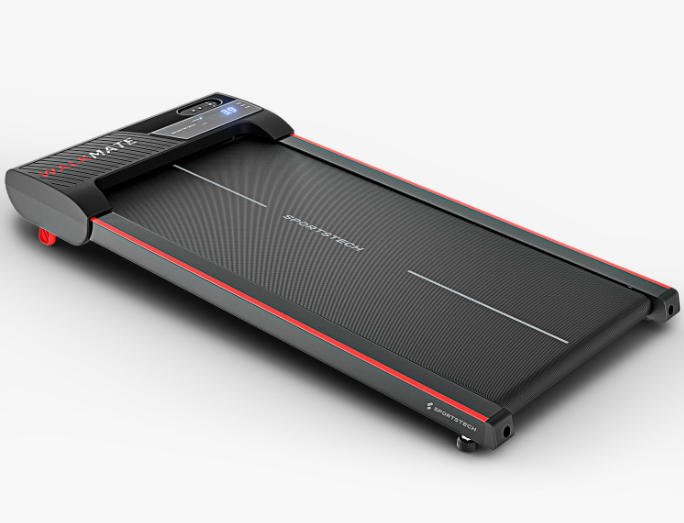
Walkmate Treadmill Product Photo
Walkmate Assembly Video
FAQ
How far is the running surface from the floor, so I can check whether the ceiling height is sufficient?
The top of the running surface is approx. 10.9 cm from the floor.
Can the treadmill be stored upright?
The Walkmate can also be stored upright.
Maintenance and cleaning.
We recommend cleaning your treadmill every few months. Dust can build up inside, which is perfectly normal for treadmills. Regular cleaning helps ensure the product lasts longer.
Here are the steps you should follow:
- Switch off the device and unplug it from the power supply.
- Wait two minutes for any residual current to discharge completely.
- Carefully unscrew the motor cover.
- Clean the inside to remove any dust and dirt that could block the ventilation.
- Lubricate the treadmill with silicone oil according to the instructions in the manual.
- Secure all parts back in place and test the device.
Please note: Carrying out this work does not affect your warranty and is part of normal maintenance.
What are the dimensions of the running surface on the Walkmate treadmill?
The running surface measures 90 x 40 cm.
What type of footwear is suitable for the treadmill?
It is important to note that treadmills are best used with trainers that have smooth, flat soles. Trail shoes or shoes with studs or chunky soles can cause excessive wear, which may damage the device.
How much power does the Walkmate treadmill consume?
The exact power consumption depends on how it is used, but is typical for a treadmill in this class.
Can the Walkmate also be used outdoors?
No, the treadmill is designed for indoor use.
What size should a floor protection mat for the Walkmate treadmill be?
The floor protection mat should be at least 110 × 55 cm.
What is the maximum user weight for the Walkmate?
The maximum user weight is 150 kg.
Does the Walkmate have an incline?
Yes, the Walkmate has a manual incline function of up to 5%.
Integrated step counter
Keep track of your steps at all times and monitor your progress directly on the display – ideal for daily exercise and setting goals.
Troubleshooting & Quick Fixes
Error SAFE – Safety Key
⚠️ Error SAFE – Safety Key
Description:
The safety key is not in place, or the magnet is too weak. Your treadmill will not start unless the key is positioned correctly.
Solution:
Check that the safety key is correctly inserted in the designated slot.
Check the magnetic force – if the magnet is weak, you can try using a different magnet.
If this does not help, you will need a replacement safety key.
👉 The replacement is easy to do at home – without affecting your warranty and much more convenient than returning the product. If this does not resolve the issue, we will be happy to collect your device under warranty. Don’t worry: if something does not go as planned during the replacement and the device is damaged as a result, we will of course take responsibility – provided you have handled the device carefully and respectfully.
Valid for: all models with a safety key
Error 1 – Cable Connection
⚠️ Error 1 – Cable Connection
Description:
The cable connection between the display, console or PCB in the motor area may be loose, disconnected or faulty.
Solution:
Disconnect the device from the power supply.
Open the motor cover.
Check all plug connections: are they secure, and are any cables broken?
Reassemble the device and test it.
👉 If the problem persists, a replacement circuit board is probably needed.
➡️ The replacement is easy to do at home – without affecting your warranty and much more convenient than returning the product. If this does not resolve the issue, we will be happy to collect your device under warranty. Don’t worry: if something does not go as planned during the replacement and the device is damaged as a result, we will of course take responsibility – provided you have handled the device carefully and respectfully.
Error 2 – Motor or Control Board
⚠️ Error 2 – Motor or Control Board
Description:
The motor or control board needs to be replaced.
Solution:
👉 Order the motor or control board directly via the chatbot.
➡️ The replacement is easy to do at home – without affecting your warranty and much more convenient than returning the product. If this does not resolve the issue, we will be happy to collect your device under warranty. Don’t worry: if something does not go as planned during the replacement and the device is damaged as a result, we will of course take responsibility – provided you have handled the device carefully and respectfully.
Error 4 – Voltage Problem
⚠️ Error 4 – Voltage Problem
Description:
The device is not receiving enough power, or the control board is faulty.
Solution:
Disconnect the device from the power supply and wait a few minutes.
Open the motor cover and check the plug connections.
Plug the device directly into a wall outlet (do not use an extension cord).
Try switching off other power-hungry devices.
If the problem persists → replace the control board.
👉 You can order spare parts directly via the chatbot.
➡️ The replacement is easy to do at home – without affecting your warranty and much more convenient than returning the product. If this does not resolve the issue, we will be happy to collect your device under warranty. Don’t worry: if something does not go as planned during the replacement and the device is damaged as a result, we will of course take responsibility – provided you have handled the device carefully and respectfully.
Error 5 – Control Board / Motor
⚠️ Error 5 – Control Board / Motor
Description:
In most cases, the control board needs to be replaced. If this does not help, the motor is faulty.
Solution:
👉 Order spare parts directly via the chatbot.
➡️ The replacement is easy to do at home – without affecting your warranty and much more convenient than returning the product. If this does not resolve the issue, we will be happy to collect your device under warranty. Don’t worry: if something does not go as planned during the replacement and the device is damaged as a result, we will of course take responsibility – provided you have handled the device carefully and respectfully.
Error 7 – Motor Overvoltage
⚠️ Error 7 – Motor Overvoltage
Description:
This is often caused by the running belt being too tight.
Solution:
Loosen the running belt (according to the manual).
If necessary, tighten it slightly, but not as much as before.
If the problem persists → replace the motor.
👉 You can order spare parts directly via the chatbot.
➡️ The replacement is easy to do at home – without affecting your warranty and much more convenient than returning the product. If this does not resolve the issue, we will be happy to collect your device under warranty. Don’t worry: if something does not go as planned during the replacement and the device is damaged as a result, we will of course take responsibility – provided you have handled the device carefully and respectfully.
Error 8 – Faulty Drive Motor
⚠️ Error 8 – Faulty Drive Motor
Description:
The drive motor is probably faulty.
Solution:
👉 Order a replacement motor directly via the chatbot.
➡️ The replacement is easy to do at home – without affecting your warranty and much more convenient than returning the product. If this does not resolve the issue, we will be happy to collect your device under warranty. Don’t worry: if something does not go as planned during the replacement and the device is damaged as a result, we will of course take responsibility – provided you have handled the device carefully and respectfully.
The spare parts list shows all the individual components used, from assembly to use.
The manual contains all the important information.