
sTread Fold Pro Treadmill FAQ
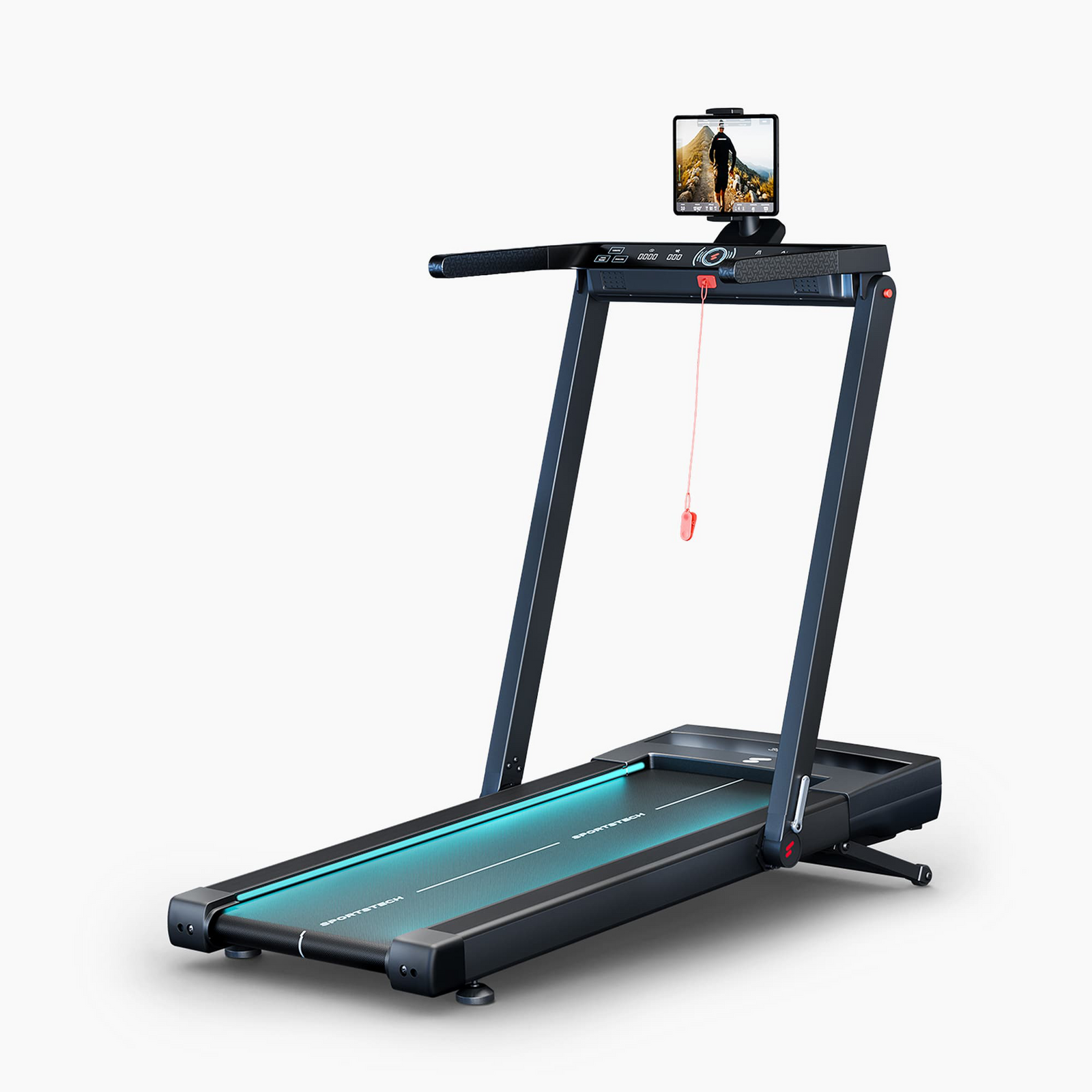
sTread Fold Pro Treadmill Product Photo
FAQ
What is the sTread Fold Pro and what makes it special?
The sTread Fold Pro is a 2-in-1 treadmill that can be used both as a traditional treadmill for running at speeds of up to 15 km/h and in home office mode as an under-desk walking treadmill at speeds of up to 6 km/h. It combines modern design with innovative technology and is ideal for anyone who wants to stay active even with limited space or while working.
How much does the sTread Fold Pro weigh?
The treadmill weighs 39.5 kg and can be moved effortlessly thanks to its integrated transport wheels.
What speed settings are available?
The treadmill supports speeds from 1 km/h to 15 km/h, making it suitable for both light walking and more intensive training. With the bar folded up, you can run at speeds of up to 15 km/h. When folded down, you can walk at speeds of up to 6 km/h. The side arms attached to the bar provide additional support when running faster.
What information does the display show?
The LCD display lets you keep track of all your key workout data, including time, speed, distance, incline, and calories.
Does the treadmill have an incline function?
Yes, the sTread Fold Pro offers an automatic incline of 11%, making your workout more intense. You can easily adjust the incline via the app, console, or remote control.
What user weight is the treadmill suitable for?
The treadmill is designed for a maximum user weight of 150 kg.
What is the patented LED color-changing function?
The sTread Fold Pro features an innovative, patented LED function that adjusts to your pulse or speed in 7 color levels, from blue to magenta. Your pulse is measured as soon as a heart rate monitor is connected to the treadmill via Bluetooth.
This feature is not only an eye-catching highlight but also provides extra motivation during your workout.
Important note: The sPuls is not included.
How can the sTread Fold Pro be used in a home office?
Thanks to its compact dimensions and its low height of just 17 cm when folded, the treadmill can be slid under a desk. In walking mode, you can move while working and make your everyday routine more active without having to set aside extra time for exercise.
What programs and training modes are available?
The treadmill offers 12 preset training programs (P01–P12) with different speed profiles. You can also manually set workout goals such as time, distance, or calorie consumption.
How do I clean and maintain the treadmill?
Cleaning: Wipe the device with a slightly damp cloth after each use. Avoid using harsh cleaning products.
Maintenance: Lubricate the running belt after the first 25 hours of use and then every 50 hours to extend the service life of the device.
How does the emergency stop work?
The sTread Fold Pro is equipped with a safety clip that attaches to your clothing. If you fall, the clip is pulled off and the treadmill stops immediately to prevent injury.
Can I connect the sTread Fold Pro to an app?
Yes, the treadmill is compatible with the Sportstech Live app. With the app, you can:
- do customized workouts with professional trainers,
- use landscape and outdoor videos,
- track workout data in real time,
- discover delicious, protein-rich recipes.
The integrated tablet holder on the bar makes it easy to follow the workouts in the app.
What should I do if I have problems with the device?
- Device won't turn on: Check the power cable and outlet.
- Treadmill belt slips: Tighten the running belt using the tool provided.
- Remote control doesn't work: Replace the batteries.
If the problem persists, please contact our customer service team.
How can customer service help?
Our customer service team can help with any questions about the treadmill, including technical issues, spare parts, or general inquiries.
Visit our service page .
Troubleshooting & Quick Fixes
Remote control only works when folded
The remote control only works when the treadmill is folded (Walk mode). When unfolded, you can control it directly via the display. Please keep these differences in mind when using the remote control, depending on the position of the sTread Fold Pro.
Remote control doesn't work
Please note that the remote control does not include a battery (CR2032). You will need to insert one separately. Also check that the battery has been inserted correctly.
Treadmill belt shifts while running
Follow these steps to adjust the running belt correctly:
1. Use the right tool - Use the Allen key provided.
2. Adjust the running belt tension - If the running belt slips, increase the tension by turning the right and left adjustment screws a quarter turn clockwise. If the running belt is stuck, reduce the tension by turning them a quarter turn counterclockwise.
3. Check the adjustment - Set a speed of 1-2 km/h and check the running belt. The belt should run smoothly and be centered.
4. Center the running belt - If the belt moves to the right, slightly tighten the right side or loosen the left side. If the belt moves to the left, make the adjustment in the opposite direction. Always adjust the tension in small increments.
The sTread Fold Pro LED lighting isn't working
If the LED lighting is switched off, you can easily turn it back on.
Press and hold the light button on the remote control for approx. 5 seconds. The remote control must have a working battery.
Alternatively, you can turn on the lights directly using the light button on the display.
Support tubes have too much or too little play
If the support tubes have too much or too little play, remove the cover at the bottom of the support tube. Use the socket wrench and Allen key provided to adjust the nut carefully.
Adjust the tension so that the support tubes are secure but can still be folded in and out without difficulty.
Error SAFE – Safety Key
⚠️ Error SAFE – Safety Key
Description:
The safety key is not correctly positioned, or the magnetic contact is not being detected. The device will not start unless the safety key is inserted correctly.
Solution:
Check that the safety key is inserted correctly.
Check the magnetic contact and, if necessary, try another magnet.
If the problem persists, you will need a replacement safety key.
👉 The replacement can easily be carried out at home without voiding the warranty. If this does not help, we will of course provide support under the warranty.
Error 1 – Cable Connection
⚠️ Error 1 – Cable Connection
Description:
The connection between the display, controller, or motor control board may be interrupted.
Solution:
Disconnect the device from the power supply.
Check the plug connections.
Check the cables for visible damage.
Reconnect the device and test it.
👉 If the error persists, the control board may need to be replaced.
Error 2 – Motor or Control Board
⚠️ Error 2 – Motor or Control Board
Description:
There may be a fault with the motor or control board.
Solution:
👉 Spare parts can be ordered directly via the chatbot.
Error 4 – Voltage Problem
⚠️ Error 4 – Voltage Problem
Description:
The device may not be receiving enough power.
Solution:
Disconnect the device from the power supply and wait a few minutes.
Plug it directly into a wall outlet.
Do not use extension cords.
Check the plug connections.
If this does not help, the control board may be defective.
Error 5 – Control Board / Motor
⚠️ Error 5 – Control Board / Motor
Description:
The cause is often the control board. If replacing it does not resolve the issue, the motor may be affected.
Solution:
👉 Order spare parts directly via the chatbot.
Error 7 – Motor Overvoltage
⚠️ Error 7 – Motor Overvoltage
Description:
This is often caused by the running belt being too tight.
Solution:
Reduce the running belt tension and test again.
If the error persists, the motor may need to be replaced.
Error 8 – Defective Drive Motor
⚠️ Error 8 – Defective Drive Motor
Description:
The drive motor may be defective.
Solution:
👉 Order a replacement motor directly via the chatbot.
How can I open the motor compartment?
Switch off the device and unplug it from the power outlet. Carefully remove the screws from the motor cover. Open the cover slowly, as the display may still be connected to the electronics.
Maintenance and Cleaning
Clean the device regularly with a slightly damp cloth. Avoid getting water or cleaning products on electronic components.
Check the screws, fastenings, and protective covers regularly.
The running belt must be lubricated regularly with silicone oil to ensure optimum performance and a long service life.
The treadmill switches off by itself
If the sTread Fold Pro is not being used, the automatic shut-off is activated after a short time. This is a normal safety feature and not a defect.
Repair Instructions
Instructions – Replacing the Upper Display on the sTread Fold Pro
The following maintenance video shows you how to replace the upper display on the sTread Fold Pro.
The video instructions were originally created for the sTread Fold and also apply to replacing the upper display on the sTread Fold Pro.
You can also watch the relevant video instructions directly on YouTube .
Instructions – Replacing the Lower Display on the sTread Fold Pro
The following maintenance video shows you how to replace the lower display on the sTread Fold Pro.
The video instructions were originally created for the sTread Fold and also apply to replacing the lower display on the sTread Fold Pro.
You can also watch the relevant video instructions directly on YouTube .
Instructions – Replacing the Running Deck on the sTread Fold Pro
The following repair instructions show how to replace the running deck on the sTread Fold Pro.
The instructions were originally created for the sTread Fold and also apply to replacing the running deck on the sTread Fold Pro.
Tools required:
– Phillips screwdriver
– Sturdy scraper or putty knife
– Open-end wrench (10 mm)
- Preparation:
Place the treadmill on a level surface and disconnect it from the power supply.
IMPORTANT: Wait 2 minutes before opening the treadmill – residual current.
Steps:
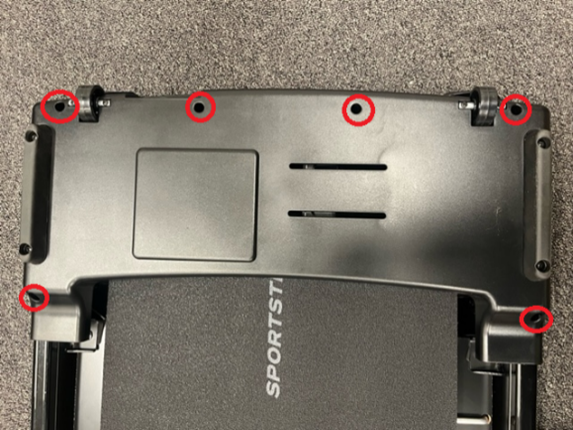
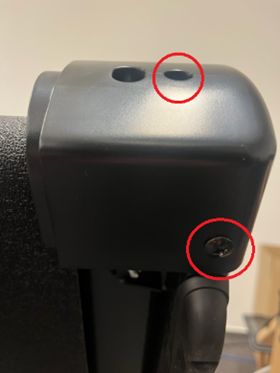
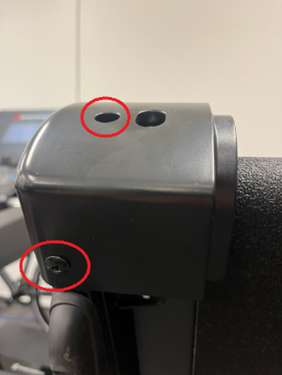
- Remove the upper cover (we recommend taking photos of the circuit board).
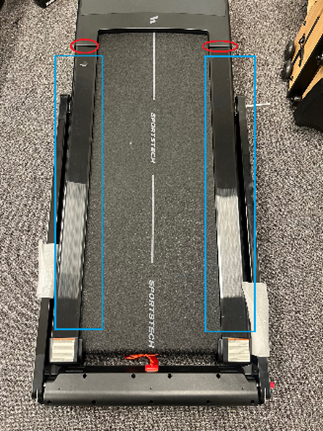
Turn the treadmill over and remove the screws from the motor cover. - Remove the corner trim and side foot rails. Caution: The LED strip is connected to the side foot rail.
- Remove the side foot rails:
The side foot rails are glued in place. Use the scraper or putty knife to remove them carefully. - Remove the defective running deck and install the new running deck.
- Attach the foot rails, removing any old adhesive residue and using new adhesive tape.
- Install the motor cover and rear trim.
- Remove the upper cover (we recommend taking photos of the circuit board).
sTread Fold Pro Spare Parts List
sTread Fold Pro Spare Parts List
The spare parts list includes all installed individual components, from assembly through to use.
sTread Fold Pro Manual
The manual contains all the important information you need.